Hand Off A Task. Watch It Actually Work.
What is Gemini Spark?
Spark is a separate tab next to Chat, built for tasks instead of questions. Describe a task and Spark tracks it as a real, persistent run: a visible plan, real tool calls (like Google Search) it makes along the way, live progress you can check on, and a finished result you can return to later. It is built to be handed a job and left alone, not answered in one turn.
What Actually Changes?
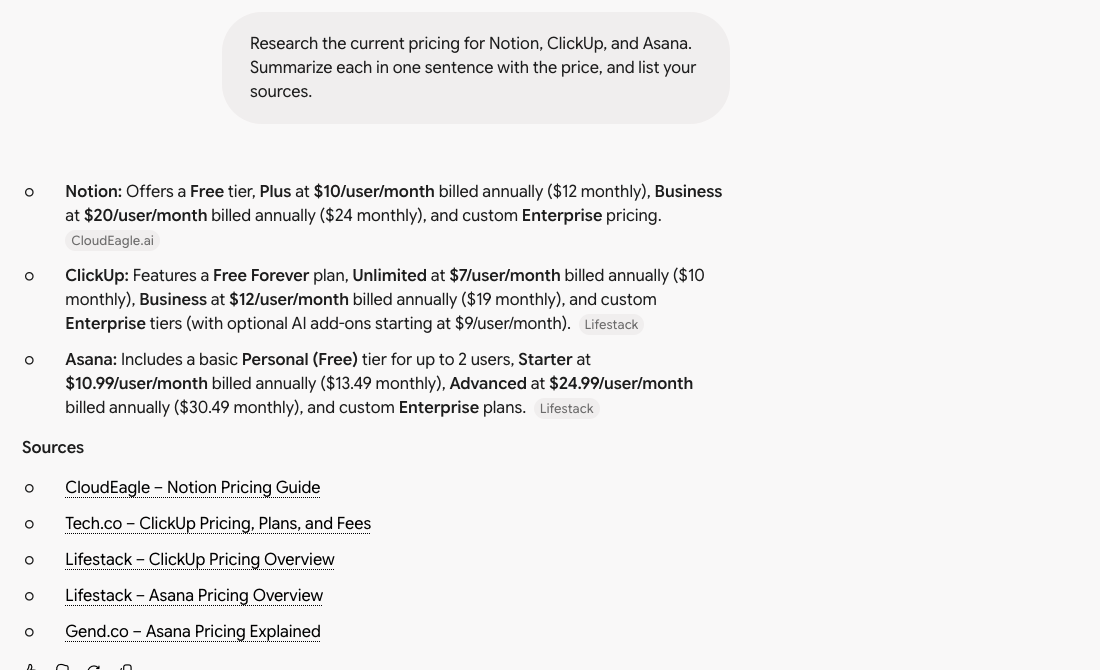
The same research question in a normal chat. It answers well, with real sources, but it happens in one turn: no visible plan, no persistent task, nothing to check on or come back to later.
Real footage: a research task submitted, real progress tracking, and a genuine synthesized digest appearing — three organized sections pulled from multiple real sources, not a single fact restated three times.
How Do You Set It Up?
Watch the walkthrough, then read the steps below.
Describe A Task, Not A Question.
Spark opens with a task composer and a Suggested list (deep research, a news digest, inbox cleanup). It is a separate mode from Chat, tuned for "go do this," not "answer this."
Be as specific as you would with a person you are delegating to: what to compare, what format you want back, and what to cite.
Type The Real Task.
Type out the actual job. Spark gives it a task title of its own the moment you submit, and the task gets saved to your task history immediately, not just this chat turn.
Give it real assistant work, not a fact lookup: "research X, Y, and Z and bring back a synthesized digest" gets you actual analysis. A narrow "what does X cost" question just gets you a fact, wasting what Spark is built for.
A Real Plan, Not A Black Box.
A side panel opens with Progress, Files, and Skills & apps. Spark actually calls Google Search as a visible tool step, not a hidden one, and narrates its own reasoning as it goes.
The Skills & apps list is what Spark is allowed to use for this task. More tools become available as you connect more apps.
Check On It Mid-Run.
The reasoning trace updates live while the task keeps working: real self-narration of what it just figured out and what it is doing next. You can leave and come back to this.
Long tasks genuinely take a while. This is built to be checked on, not stared at.
A Real Synthesized Result, Not A Fact Dump.
The task marks itself Complete and the result is organized into real sections, each one pulling together multiple real, cited sources into an actual digest — the kind of work you would hand to an assistant, not a search-and-paste answer.
If a task fails (it happens — Spark is Beta), just describe it again. A real attempt at a similar task failed outright during earlier testing; retrying got a clean result.
What Should You Use It For?
Hand off competitor or vendor research as a task, keep working, and come back to a cited comparison instead of babysitting a chat.
Set a research task running while you work on something else, then review the sourced summary when it is done.
Delegate recurring research or digest-style tasks so you are checking a finished result, not doing the digging yourself.
When Should You Skip It?
- •You want a quick, single answer. Plain Chat is faster and Spark's task overhead buys you nothing for a one-turn question.
- •The task needs a tool that is not in Skills & apps yet. Check the list before assuming Spark can reach a specific app or account.
- •You need certainty it will finish. Spark is Beta and a run can genuinely fail — plan for a retry, not a guarantee.
What Does This Replace?
A standing research request to an assistant or a junior researcher, for tasks that are mostly "go find this and bring back a sourced summary." It does not replace judgment on the result — check the sources same as you would with any assistant's work.
Where Next?
* Tool outputs shown in video walkthroughs are representative. Results vary by account, setup, and configuration.
Verification
- Last verified:
- 2026-09-04
- Platform tested:
- gemini.google.com/spark (web)
- Plan tested:
- Google One AI Ultra
- Model shown:
- Gemini (Spark, Beta)
- Official source:
- Google: Gemini Apps Help
- Screenshots updated:
- 2026-09-04 (full real capture: task submitted, plan, live progress, finished cited result)