Ask What Happened Today. Watch It Actually Look.
How does Grok search X and the web in real time?
Grok — even on the free Fast mode, no subscription needed — reads live X posts and open web pages while it answers, and shows its work: the exact search queries it ran, how many posts each one found, and a citation on every claim it makes from them. It is not describing a general capability; it is showing you the actual queries as they run.
What Actually Changes?
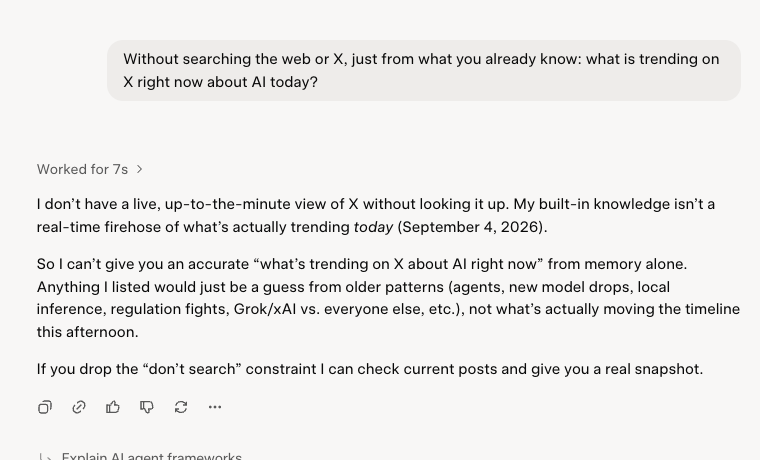
The identical question below, asked with search explicitly turned off: "I don't have a live, up-to-the-minute view of X without looking it up... If you drop the 'don't search' constraint I can check current posts and give you a real snapshot." An honest admission, not a guess.
Real footage: the exact same question — "What is trending on X right now about AI today?" — asked again with search on. Same prompt, only the toggle changed: the real query typed in, live X queries running, and a structured, cited answer actually appearing.
How Do You Set It Up?
Watch the walkthrough, then read the steps below.
Five Real Modes, One Free.
The mode picker shows Fast, Build, Auto, Expert, and Heavy. Fast is free and is what this whole lesson is built on — no subscription required. Build, Auto, and Expert need at least SuperGrok Lite ($10/month); Heavy needs a higher tier still.
Expert and Heavy are for deeper reasoning on hard problems; Build is for turning a prompt into a working app. If you only ever use Fast, you are not missing search — that part is free.
Ask Something Time-Sensitive.
The kind of question that actually needs live information: what is happening right now, not what happened up to some training cutoff.
Vague questions get vague search. "What is trending about AI today" works better than "tell me about AI."
Watch The Real Queries Run.
Grok does not just say "let me check X" — it shows the literal search strings, live: "AI OR \"artificial intelligence\" OR chatgpt," each one tagged with how many posts it found.
This is the actual query, not a paraphrase. If the results look off, you can see exactly why — the search itself was too broad or too narrow.
Expand The Full Trace.
Click "Worked for Ns" and see everything: web search plus multiple X searches, refined query by query, real result counts on each.
On a question you do not fully trust the answer to, this is where you check the work instead of just trusting the summary.
A Structured, Cited Answer.
The final answer is organized into real sections with a source tag on the claims that came from search, not a wall of undifferentiated text.
The source tags are small and easy to skim past. Check them on anything you plan to repeat as fact.
What Should You Use It For?
Check what is actually trending right now before you write about it, with the real X posts behind the summary, not a guess dressed up as current.
Research a client's industry news same-day instead of relying on a model whose knowledge stops months ago.
Fact-check a claim against what people are actually saying on X right now, with the search trail visible to double-check.
When Should You Skip It?
- •The question is not time-sensitive. Searching X for a stable fact is slower than just asking, with no real benefit.
- •You need Expert-, Build-, or Heavy-level reasoning on a hard problem. Those are different modes from what this lesson covers — Expert and Build need at least SuperGrok Lite, Heavy needs a higher tier.
- •You need certainty, not a snapshot. X search reflects what is being posted right now, which includes rumor and hype, not just verified fact — the citations are a starting point for checking, not a guarantee.
What Does This Replace?
Manually searching X or Google in a separate tab and pasting results back into a chat. It does not replace judgment on what you find — a real citation trail is still someone's post, not verified truth.
Where Next?
* Tool outputs shown in video walkthroughs are representative. Results vary by account, setup, and configuration.
Verification
- Last verified:
- 2026-09-04
- Platform tested:
- grok.com (web)
- Plan tested:
- SuperGrok Lite (search itself is free — no subscription required)
- Model shown:
- Grok (Fast mode)
- Official source:
- xAI: Grok Help
- Screenshots updated:
- 2026-09-04 (re-verified on SuperGrok Lite: mode picker, live search, expanded trace, cited answer)